How Heimish Marketing Professionals Can Use Melius AI
How Heimish Marketing Professionals Can Use Melius AI
From a one-line brief to a finished campaign: a beginner walkthrough, a full platform tour, and a real Tishrei example, frame by frame.
If you do marketing for heimish businesses or mosdos, your week probably looks like this: a full-page ad for the weekly glossy, a journal ad for a dinner, a flyer for an event, a seasonal push before Yom Tov. The design queue is always the bottleneck. Melius (melius.com) is built for exactly that kind of volume: one canvas where you generate images, video, audio, and text with the latest models, wire the pieces together, and iterate until it looks like your brand.
This guide does three things. First, a simple walkthrough for your first fifteen minutes. Then a tour of every major part of the platform and how the pieces connect from brief to finished campaign. Finally, a real Tishrei campaign produced with Melius, broken down frame by frame, plus a playbook of heimish marketing use cases.
Part 1: Your first fifteen minutes
- Create a free account at melius.com. The Free plan includes limited trial credits, access to all models, and unlimited seats, so a whole studio can look over your shoulder while you learn.
- Create a project. Projects hold canvases, and a canvas is the infinite board where the work happens.
- Drop your first node. Nodes are the building blocks: text, image, video, file, and group nodes. Right-click the canvas, choose New node, then Text, and paste in your brief.
- Or just ask Mel. Mel is the built-in agent. Tell it in chat: "Create a text node with my brief and wire it to an image node for a full-page magazine ad." It assembles the workflow, routes the right model, and shows you every prompt it writes.
- Run the generation. Connect nodes with edges, pick a model, and run. Every run is saved as a version, so you can branch off any earlier round instead of overwriting your best result.
- Download or keep iterating. Happy with round three but curious about round four? Both stay on the canvas.
That is the whole loop: brief on the canvas, the agent assembles the workflow, the models generate, and versions accumulate until the client signs off.
Part 2: The platform, piece by piece
Canvas, nodes, and edges
Everything in Melius lives on the canvas. You arrange nodes on the board and wire them together with edges. A text node holds your brief or your copy. An image node generates pictures. A video node generates clips. File nodes hold uploads, and group nodes keep big campaigns organized. An edge means context: wire your brief into an image node and the model reads it before it draws. Multiplayer is built in, so collaborators (and agents) show up on the canvas in real time.
Runs and versions
Every generation is a run, and runs are versioned. That sounds technical, but in practice it means you never lose a good take. Generate five headline images, send the client round two, and when they ask for "something like round one but warmer," you branch off round one instead of starting over.
Mel and agent skills
Mel is the agent that lives in the canvas chat. It can create canvases, drop nodes, wire edges, run generations, upload files, and download outputs. Agent skills are reusable instructions Mel follows in chat, and teams can set guidance that applies workspace-wide. The number of custom skills scales by plan: one on Creator, three on Growth, ten on Professional, unlimited on Enterprise.
Every major model under one roof
You are not betting on one model's taste. Melius routes across the current generation of image, video, audio, and language models, and you can run the same brief through two engines and keep the better take.
| Job | Models available |
|---|---|
| Images | Flux, Seedream, Nano Banana, GPT Image, and more |
| Video | Veo, Sora, Kling, Seedance |
| Audio and voice | ElevenLabs, with custom voices on Professional and up |
| Text | GPT, Claude, Gemini, Grok |
The brand anchor: the biggest lever you have
Melius's own marketer documentation calls this out, and they are right. A brand anchor is a single text block, a few hundred to a couple thousand words, that captures your brand voice, palette, typography, product details, and your do-and-don't rules. You drop it on the canvas as a text node and wire it into every image or video node you want it to influence, or reference it inside a prompt with @. The agent appends it to every generation automatically.
Their shortcut for building one: open Claude or ChatGPT, paste in the client's website, two or three existing campaign images, the brand guidelines if they exist, and a few past ads that performed. Ask for a brand brief covering voice, palette, typography, photography rules, and do's and don'ts. Save it as brand.md and paste from it into every canvas. Done well, this is the difference between "this looks AI-generated" and "this looks like our brand."
Multiplayer, comments, and Slack
The canvas is multiplayer in real time: your copywriter, your client, and Mel can all be on the same board. Comments live on the canvas too. On Professional and up, a Slack agent lets the team poke Melius from where they already work.
Assets and fonts
Higher tiers add a Semantic Assets Manager (a searchable home for everything you have generated) and expanded font options, which matters once you are managing a season of campaigns across several clients.
Driving Melius from Claude with MCP
If your studio already lives in Claude, the Melius MCP server lets Claude (Desktop, Code, or any MCP-compatible client) read and write your projects directly: create canvases, drop nodes, wire edges, run generations, upload files, and download outputs, all without leaving the chat. Claude can even render a live image of the canvas back into the chat, which is handy for confirming a layout before a big bulk run. One note from the docs: video is generated on the canvas through video nodes, not uploaded.
Plans and credits
| Plan | Per month | Credits | Agent skills | Good fit |
|---|---|---|---|---|
| Free | $0 | Limited trial | - | Learning the canvas |
| Creator | $18 | 20,000 | 1 | Solo marketer, lighter volume |
| Growth | $45 | 50,000 | 3 | The sweet spot for a small heimish studio |
| Professional | $255 | 300,000 | 10 | Agencies: Slack agent, asset manager, custom voices |
| Enterprise | Contact sales | Custom | Unlimited | Priority queue, unlimited API and MCP calls |
Team settings include a live view of credits consumed in the current cycle, broken down by model and by member. Useful for spotting expensive generations before the client invoice goes out.
Part 3: A real Tishrei campaign, frame by frame
Here is what finished output looks like. "Lalechet" is a demo brand for a Tishrei charter service flying JFK to TLV, and the 36-second campaign piece produced with Melius includes both a video spot and a print panel series. Every frame below comes straight from that piece.
The spot opens on a golden-hour runway shot. Generated video - no shoot day, no location permit.

Cruise footage from the same generated sequence, livery consistent with the opening frame.
The print series carries the same world into stills. The cabin panels show meal service and kids' activity books, with headlines in a quiet, confident voice: "Comfortable timings. Delicious, quality meals. A smoother ride." and "This is Lalechet." The branding holds up at every zoom level: the plane livery, the headrest covers, even the crew aprons, which read "Excellence served at altitude."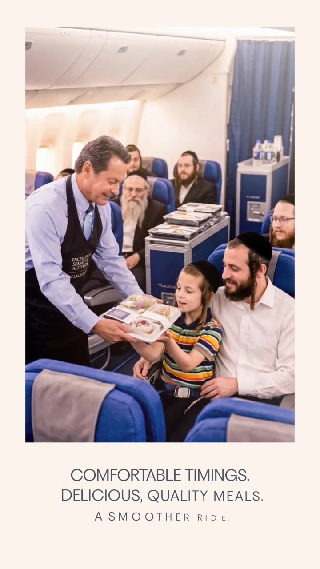
Print panel: cabin meal service, headline set in clean real type.
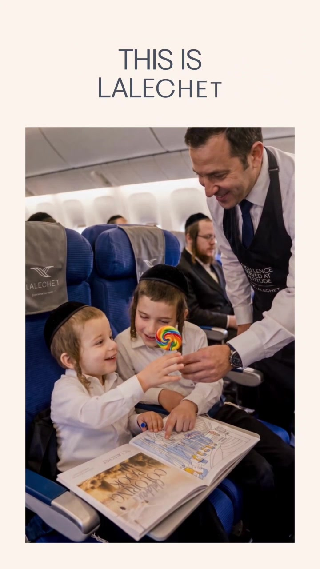
Print panel: "This is Lalechet" - the kind of family-warmth shot a charter brand lives on.
Because this is a Tishrei campaign, the seasonal cues do real work. The b-roll moves through the esrog market, lulav bundles, and sukkah-covered balconies in Yerushalayim. No copy needed - a heimish viewer reads the season instantly.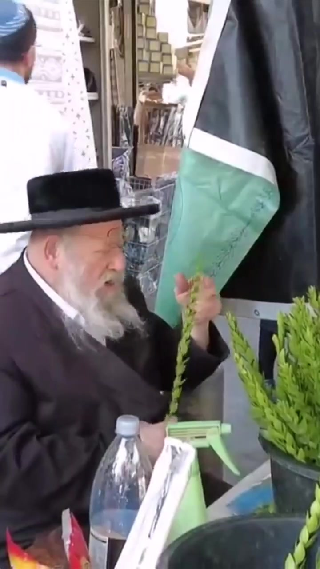
Seasonal b-roll: the esrog market before Sukkos.
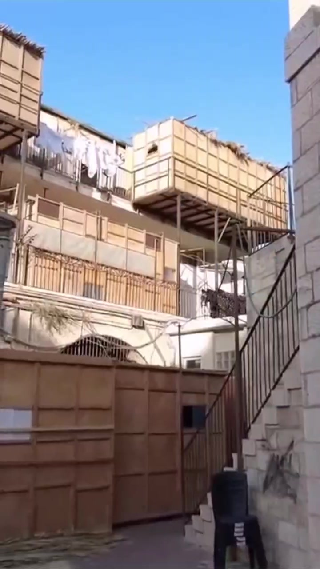
Sukkah-lined balconies. The season lands without a word of copy.
The schedule panel is my favorite piece, and it teaches the most useful lesson. Every flight pairs its English date with the Hebrew date - ד׳ תשרי, י״א תשרי (מוצאי יו"כ), כ״ד תשרי - set in crisp, correct type. More on why that matters in Part 4.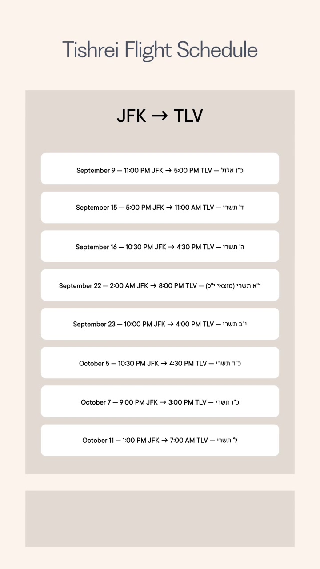
The Tishrei flight schedule: every English date paired with its Hebrew date in real type.
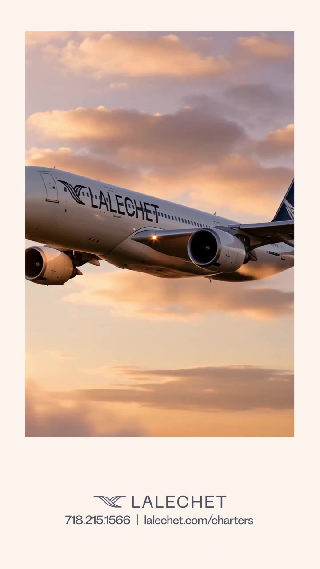
Back cover: logo, phone number, URL. One cream-and-navy palette across every piece.
What to notice: one visual language across video and print, because everything came off one canvas with one brand context. That is the whole pitch in a single example.
Part 4: The heimish marketing playbook
Weekly retail ads
Grocery specials, clothing and shoe stores, Judaica shops, takeout spots. Community publications like The Monsey View - which serves Monsey, New Square, Wesley Hills, Airmont, New City, and Chestnut Ridge - sell display ads in standard sizes from full page down. The work is variant work: same client, same layout, new specials every week. Melius positions itself for exactly this split - concept work that wins the pitch, and variant work that runs the campaign at volume.
Mosdos and fundraising
Dinner journals, campaign heroes, event flyers, matching-campaign graphics. Build a brand anchor per mosad and the look stays consistent from the save-the-date through the journal cover to the thank-you email, even when three different people touch the canvas.
Events
Chinese auctions, dinners, melave malkas, camp recruitment, shul events. Melius pitches event graphics, posters, and decks "on the fly, without a design ticket" - which is what you need when the flyer is due Thursday and the honoree list changed twice.
The seasonal calendar
Tishrei travel and arba minim, Pesach programs, camp season, back-to-cheder sales, Chanukah gift guides. Heimish marketing runs on the Jewish calendar, and seasonal spikes are where generation speed pays for the subscription by itself.
Hebrew and Yiddish copy: set it in real type
An honest limitation worth planning around: today's image models still garble Hebrew and Yiddish text more often than not. The workflow that holds up is the one the Lalechet schedule uses. Generate the photography and the layout, leave clean space for the words, then set the copy in a real typeface. A Yiddish line like דער גלאַטער וועג קיין ארץ־ישׂראל deserves correct spelling and a proper font - never ask the image model to draw it.
Respect the market's standards, once, in the anchor
Community publications run under rabbinical guidance, and clients have rules: many heimish publications do not print photos of women, some clients want no faces at all, and every brand has its own red lines. Write those rules into the brand anchor a single time - "no women in imagery," "modest dress in every scene," "no Shabbos imagery in ads that will appear before Shabbos" - and every generation respects them, instead of fixing violations ad by ad.
Working tips
- Write the brand anchor before your first big run. It is the single biggest thing you can do for consistency.
- Branch with versions instead of re-prompting from zero.
- Watch the credits view in team settings. Video runs cost more than image runs, and the breakdown by model and member tells you where the money went.
- Use prompt enhancement (Professional and up) when a prompt keeps missing.
- For bulk variant runs, drive the canvas from Claude through MCP and have it render the canvas back into chat to confirm the layout before you spend the credits.
Update: we recreated the campaign inside Melius
After this guide went up, we went back and rebuilt the Lalechet Tishrei campaign inside Melius on a fresh free account, to check the workflow against reality. It holds up, and the details are worth sharing:
Sign-in is email-only. You enter your address at app.melius.com and a one-time code lands in your inbox in seconds. There is no password to manage.
A new free account starts with 1,500 bonus credits, and every run shows its price before it spends anything: Mel asks "Start generation?" with the exact credit cost and waits for your Approve click.
Each key frame - the golden-hour runway hero, the cabin boarding scene, and the closing shot above the clouds - cost 169 credits on Seedream 5.0 Pro at vertical 9:16 and 2K resolution. Three frames ran about 500 credits total, leaving most of the trial balance for variants and video.
Mel writes real production prompts. Given a plain-English brief per frame, it produced language like "telephoto compression," "golden rim light," and "standing water puddles reflecting the sunset" with no editing needed.
Export is one click. Select the node, open the image panel, and download the full-resolution original. Ours came out as 1584 x 2816 JPEGs, ready for layout.
The recreated frames live in a project called "Lalechet Tishrei Campaign - Recreation" on the author's account. Two honest limits from the run: video models (Seedance, Kling) are available on the free plan but cost more than images, so read the Approve dialog before you run them, and the trial credits will not stretch to a full multi-scene video campaign - budget a paid month for that.
Sources
- Melius homepage - https://www.melius.com/
- What is Melius? (official docs) - https://docs.melius.com/
- Brand anchor guide for marketers - https://docs.melius.com/help-center/marketers/brand-anchor
- MCP server overview - https://docs.melius.com/mcp/overview
- Melius pricing - https://www.melius.com/pricing
- The Monsey View - https://themonseyview.com/
About the screenshots: every image in this article is a frame from a campaign piece produced with Melius, supplied by the author. The piece shows finished campaign output, not the product interface. Product details above come from Melius's own website and documentation, checked September 9, 2026. Since then, the campaign's key frames have been recreated inside Melius on a free account - see the update section above for the verified workflow and real credit costs.